This Classic Commerce extension is a demo for a job application. It is a proof of concept only and cannot be used for production – the payment gateways are programmatically disabled. Although originally written for WooCommerce it is not compatible with WooCommerce from version 3.6.0. However, it is compatible with Classic Commerce which was forked from WooCommerce 3.5.3.
Simple Variations is a WooCommerce extension that implements the variations of a WooCommerce variable product as the Cartesian product of its variation attributes. Simple Variations uses the variation attributes of a WooCommerce Variable product to specify the components of a composite product. Since the properties of a specific variation of a composite product can be derived from the properties of the specific components that form the variation, the variation does not need to exists in the database but can be generated dynamically from the components. For example, consider ordering a custom made hamburger where the customer can choose from different types of meats, buns and cheeses. The price of the chosen hamburger would be the sum of the prices of the selected meat, bun and cheese. So, instead of specifying the price for the Cartesian product of the components only the price of the individual components need to be specified. Similiarly, the in stock quantity would be the minimum of the in stock quantities of the selected components. Since the composite variations are virtual (I.e. – They don’t really exists but are dynamically generated as needed.), this extension can very efficiently (constant time O(1) and constant storage O(1) with respect to n number of variations) support up to 8,192 products each of which can have up to 562,949,953,421,312 variations. The easiest way to understand the advantages of this approach is to try the buyer’s demo page and the seller’s demo page. For the seller demo page try adding a Sourdough bun or a new component Onion with the values Red and Sweet as I have pre-loaded the images for these in the Media Library.
But First, A Very Important Caveat
I wrote this WooCommerce extension to teach myself about WooCommerce and to have a demo extension to prove to possible employers that I have acquired expertise with WooCommerce. So, this extension is intended to be a demo extension for a job application. Since it uses a proprietary implementation for virtual variations that was developed and supported only by a single developer it cannot be distributed for production. If a future version of WooCommerce should break this implementation and the developer is not available to fix it (euphemism for I have died or am critically ill) then a website using this extension will not be able to upgrade to the new version of WooCommerce. As a mitigating measure I added the functionality to convert products using my proprietary virtual variations to standard WooCommerce variable products. However, as this is only practical for products with a really small number of variations this extension is of limited viability and I have decided not to distribute it for production.
How to Create a Simple Variable Product
First, define the components using WooCommerce product attributes.
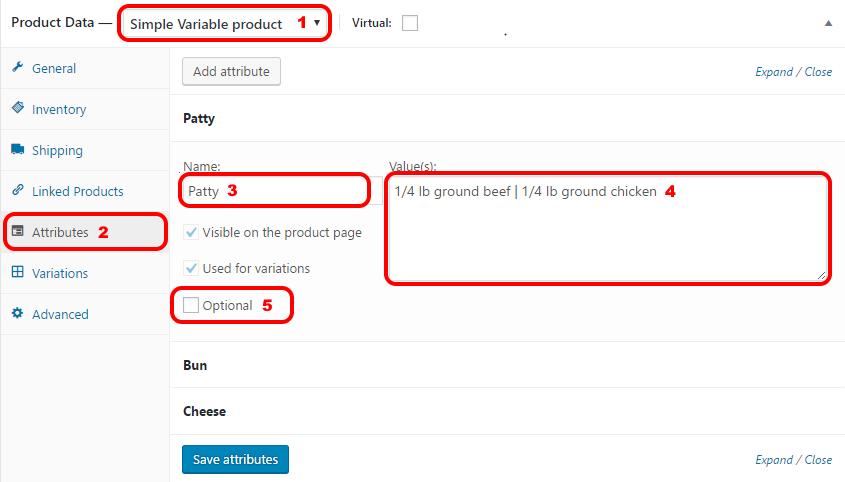
- Set the product type to Simple Variable.
- Display the Attributes pane.
- Enter your component name.
- Enter the components separated by a |.
- If the component is optional check the optional checkbox.
Then, assign prices, quantities, … to the components using WooCommerce product variations.
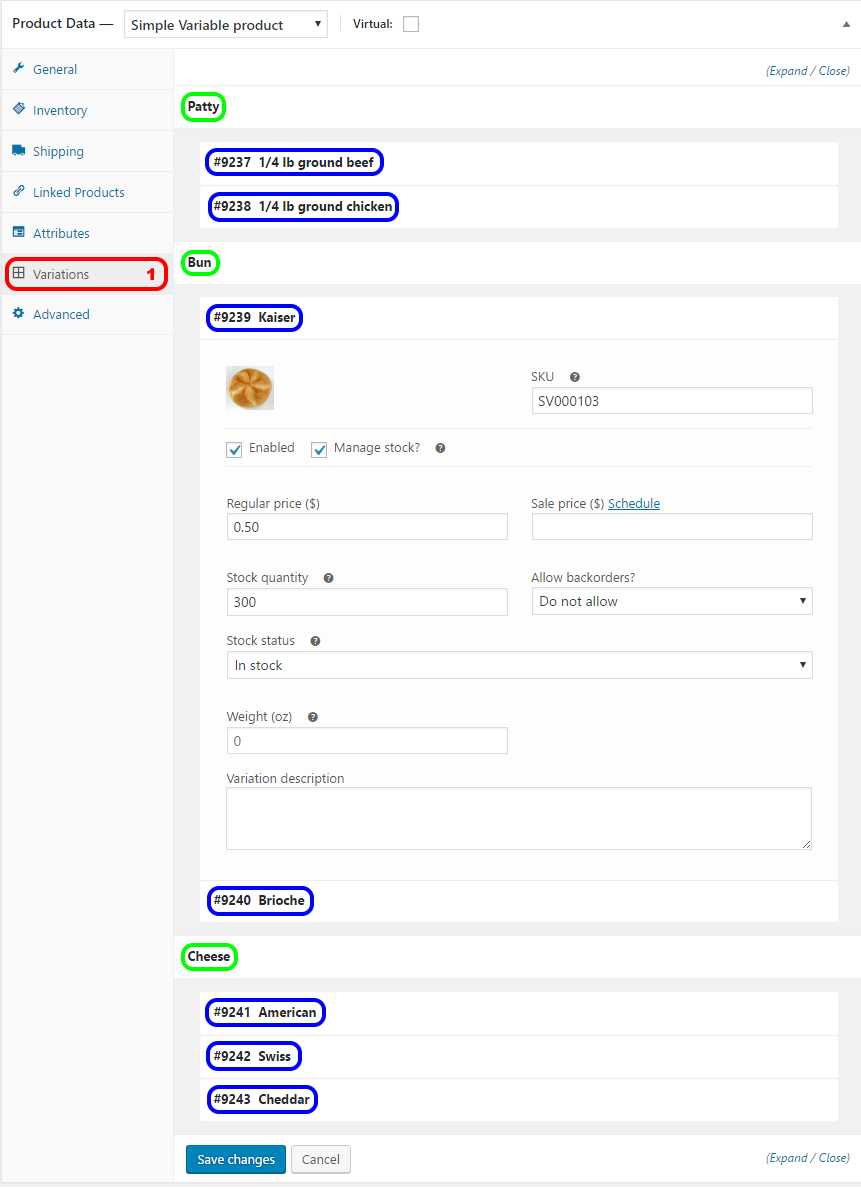
The Variations pane of a Simple Variable product is different from the Variations pane of the WooCommerce Variable product. Instead of the user creating a variation by specifying the attributes of the variation this plugin automatically generates a “base variation” for each component and displays these variations in the Variations pane. A variation in the Variations pane of a Simple Variable product is not the same as a variation in the WooCommerce Variable product pane. These variations are really the components.
- Display the Variation pane.
- For each component (marked with blue in the example) set the price, the in-stock quantity and other properties.
Other Things to Try
- Disable virtual variations to force generation of Classic Commerce compatible variation database rows for each variation.
- Change the product type to variable to convert from a simple variable product to a Classic Commerce variable product.
Tracking Component Stock Quantity
Simple Variations will propagate changes to the stock quantity of a product variation back to the components of the product variation, i.e., reducing the stock quantity of a product variation by one will reduce the stock quantity of each of its components by one. Simple Variations provides a report of stock quantity by components.
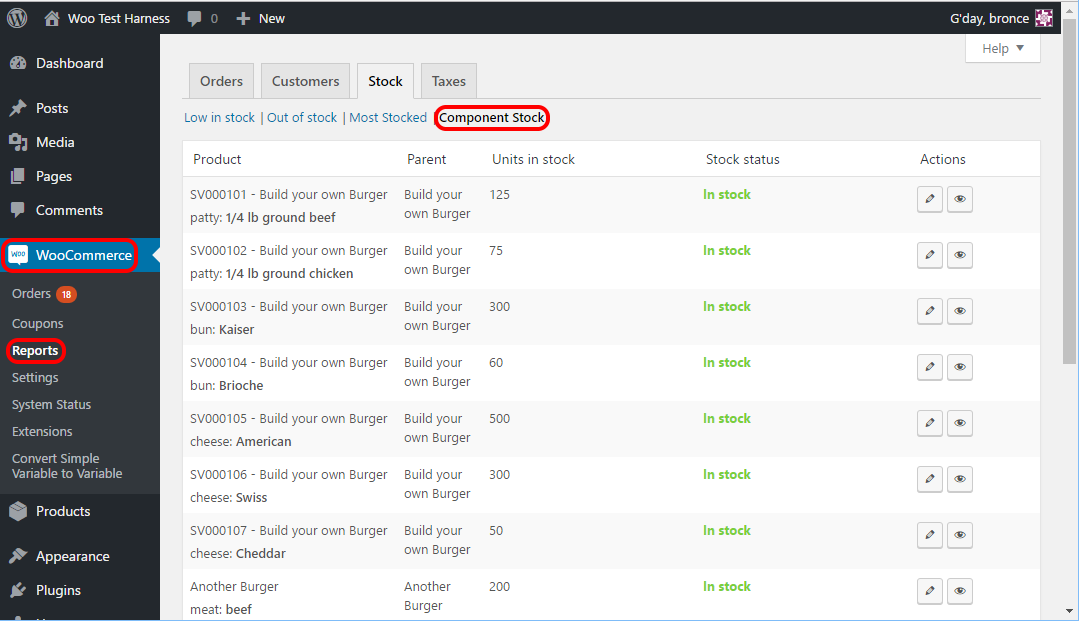
To display this report select WooCommerce > Reports > Component Stock from the Dashboard.
Bulk Converting Simple Variation’s Simple Variable Products not using virtual variations to Standard WooCommerce Variable Products
Simple Variation’s Simple Variable products not using virtual variations can be converted into standard WooCommerce Variable products. Specifically, only the variation data will be preserved, the component data will be removed and the relationship between components and variations will be lost. The bulk action “Convert to Variable” of the Products page will convert the selected products to standard WooCommerce Variable products. Inappropriate products will be ignored so you can simply just select all to convert all your Simple Variable products not using virtual variations.
Implementation Details
The Simple Variable product is implemented using the facilities of the WooCommerce Variable product. Specifically, the components are used to dynamically generate a virtual WooCommerce Variable product variation for each member in the Cartesian product of the components where the price of the composite variation is the sum of the prices of the components and in stock quantity of the composite variation is the minimum of the in stock quantity of the components. The Attribute pane of a WooCommerce Variable product is overloaded to define the component names and the Variations pane of a WooCommerce Variable product is overloaded to set the properties of the components. A hook is installed to propagate changes to the in-stock quantity of composite variations to its components, i.e. reducing the in-stock quantity of a composite variation by one reduces the in-stock quantity of each of its components by one. With respect to the MySQL database a Simple Variable product is stored as a WooCommerce Variable product with some additional meta data. The base components are also stored as variations differentiated from the standard WooCommerce product variations by some meta data. If you disable virtual variations then the composite variations are also generated and stored in the database as almost standard WooCommerce product variations. This of course is linear O(n) time and linear O(n) storage with respect to n the number of variations and this can be very bad if n is large. However the advantage is since the composite variations already exists as almost standard WooCommerce product variations it is very easy to quickly convert Simple Variable products not using virtual variations to a standard WooCommerce Variable product. The bulk action “Convert to Variable” of the Products page will convert the selected products to standard WooCommerce Variable products. However, as the components will no longer exists the in-stock quantity by components will be lost.
Download
A beta version is available for download . This beta version is for use as a proof of concept demo product and should not and cannot be used in production – the payment gateways are disabled. The most recent version of WooCommerce that this beta version is fully compatible with is 3.5.8. (From version 3.6.0 WooCommerce maintains a cache of product meta data in the database table “wp_wc_product_meta_lookup”. WooCommerce uses rows for products from the “wp_posts” table and “wp_postmeta” table to build this cache. Since, virtual variations are virtual these rows do not exists for virtual variations.) However, it is compatible with Classic Commerce which was forked from WooCommerce 3.5.3.
Image Author Attribution
The images on the demo pages are from Wikimedia and are either in the public domain or have a Creative Commons license. The required author attributions are below since there is no place to put them directly on the demo page.
- Beef Patty(Hereford Cattle)
- By User Robert Merkel on en.wikipedia – US Department of Agriculture, Public Domain, Link
- Chicken Patty(Chickens)
- By Andrei Niemimäki from Turku, Finland – Friends, CC BY-SA 2.0, Link
- Kaiser Bun
- By Kobako – photo taken by Kobako, CC BY-SA 2.5, Link
- Brioche Bun
- CC BY-SA 3.0, Link
- American Cheese
- By Steve Spring, Attribution, Link
- Cheddar Cheese
- By I, J.P.Lon, CC BY-SA 3.0, Link
- Red Onion
- By © User:Colin / Wikimedia Commons, CC BY-SA 3.0, Link